2024
B2B SaaS, POS, Tablet
POS Ordering Screen Redesign
When I joined the project, our restaurant tablet POS system had many experience issues that made the ordering flow slow and confusing.
I worked with two other designers to audit the existing product, then led usability testing in real restaurant environments to validate our direction. We focused on table service staff as our primary users and restructured the ordering flow around how they actually work. By the end of the project, I built a customized M3-based design system from scratch, giving the team a shared foundation that made future design and engineering handoffs more consistent.

Solution
[01]
Much Clearer structure
Reorganized actions into three clear levels: order-level, single-item, and bulk actions for selected Items.
Order-level actions in a reusable order panel
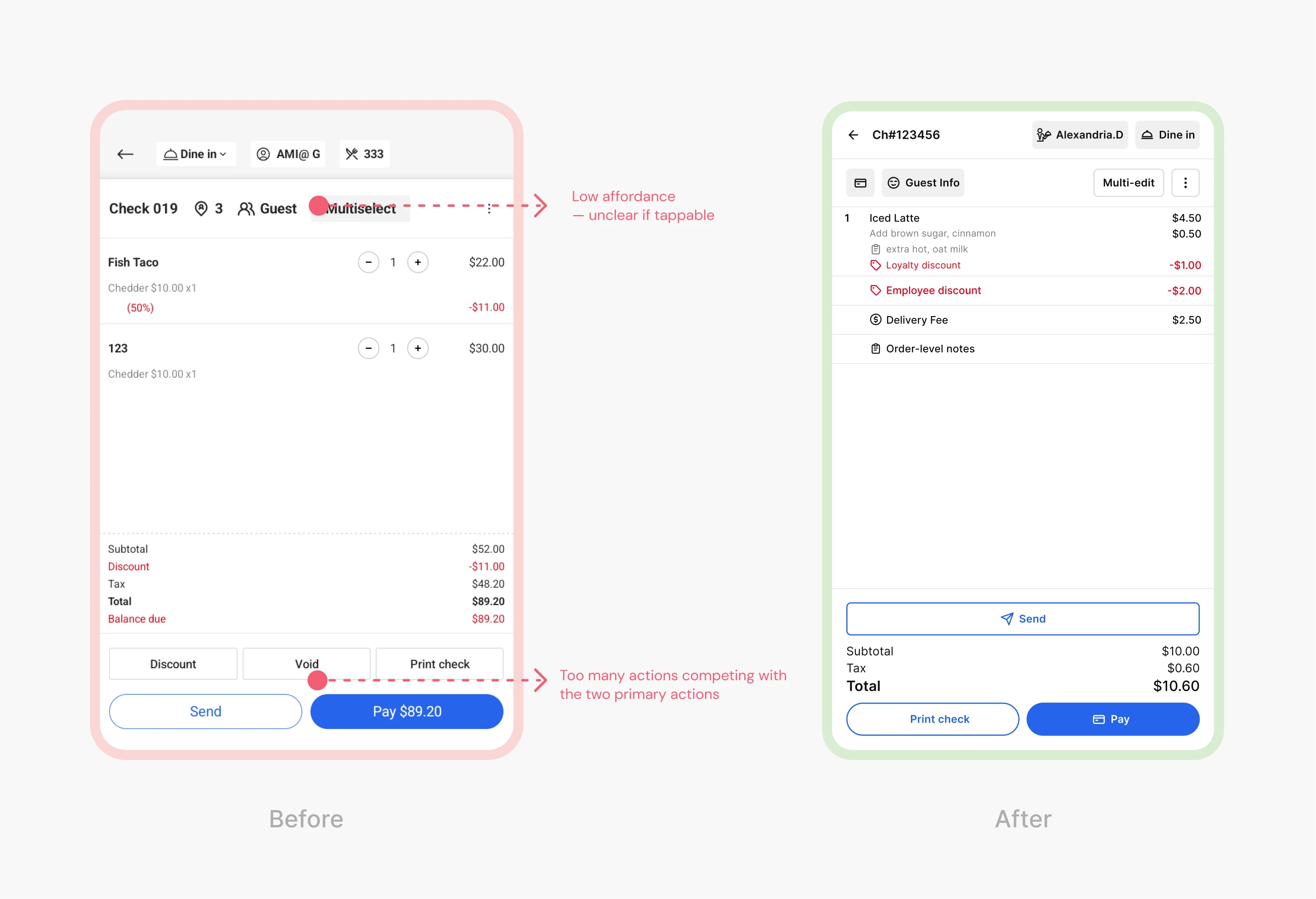
All order-level actions are centralized in the order panel for faster and more predictable access. Frequently used actions are surfaced directly, while less-used actions are grouped under the “More” menu based on usage patterns.
Item-level actions in a consistent panel
The previous design separated modifiers from item-level actions, making item discounts difficult to discover. The redesign introduced a consistent interaction pattern for items with and without modifiers.
Multi-edit items
Multi-edit lets users select multiple items and apply actions in bulk, such as sending items to the kitchen or applying discounts. The “Multi-edit” label was validated through usability testing.
[02]
Higher affordance for high-frequency actions
High-frequency actions were prioritized based on usage data, with consistent minimum touch targets to reduce mis-taps and support faster order taking.
[03]
Built a scalable design system
Built a M3–based design system with light and dark mode support to improve consistency and reduce design-to-development handoff time.

Most Memorable Moment
Most Memorable Moment: When design can't decide, data does.
What stayed with me wasn't the final layout. It was the moment I realized I was about to make a major design call based entirely on assumption, and I stopped myself.
We were redesigning the ordering page for a restaurant POS system, and I hit a wall. Different restaurants have wildly different menus: some have twenty items, some have two hundred. A flat layout works beautifully for the small ones. Layered filtering makes more sense for the large ones. Both were defensible. Neither felt conclusive. Instead of picking one and hoping, I asked an engineer to pull the actual menu data from our existing users. Average item counts, edge cases, the real distribution. Once I saw the numbers, the decision became obvious. I wasn't guessing anymore. I was designing for what was actually true.
That moment changed how I think about design ambiguity. When two directions both seem reasonable, it usually means I don't have enough information yet. The instinct to just pick one and move fast is real, but so is the cost of getting it wrong. My job isn't to have good taste. It's to find the most honest answer I can before I commit.
My Team & My Role
My Role
Product designer
Duration
6 weeks
Tools
Figma
Team
1 PM + 3 PD + 2 Scrum teams
We Didn't Patch the POS. We Rebuilt How It Thinks.
Less jargon. More buy-in.
Audit Existing Product, Presentation, Stakeholder Interviews
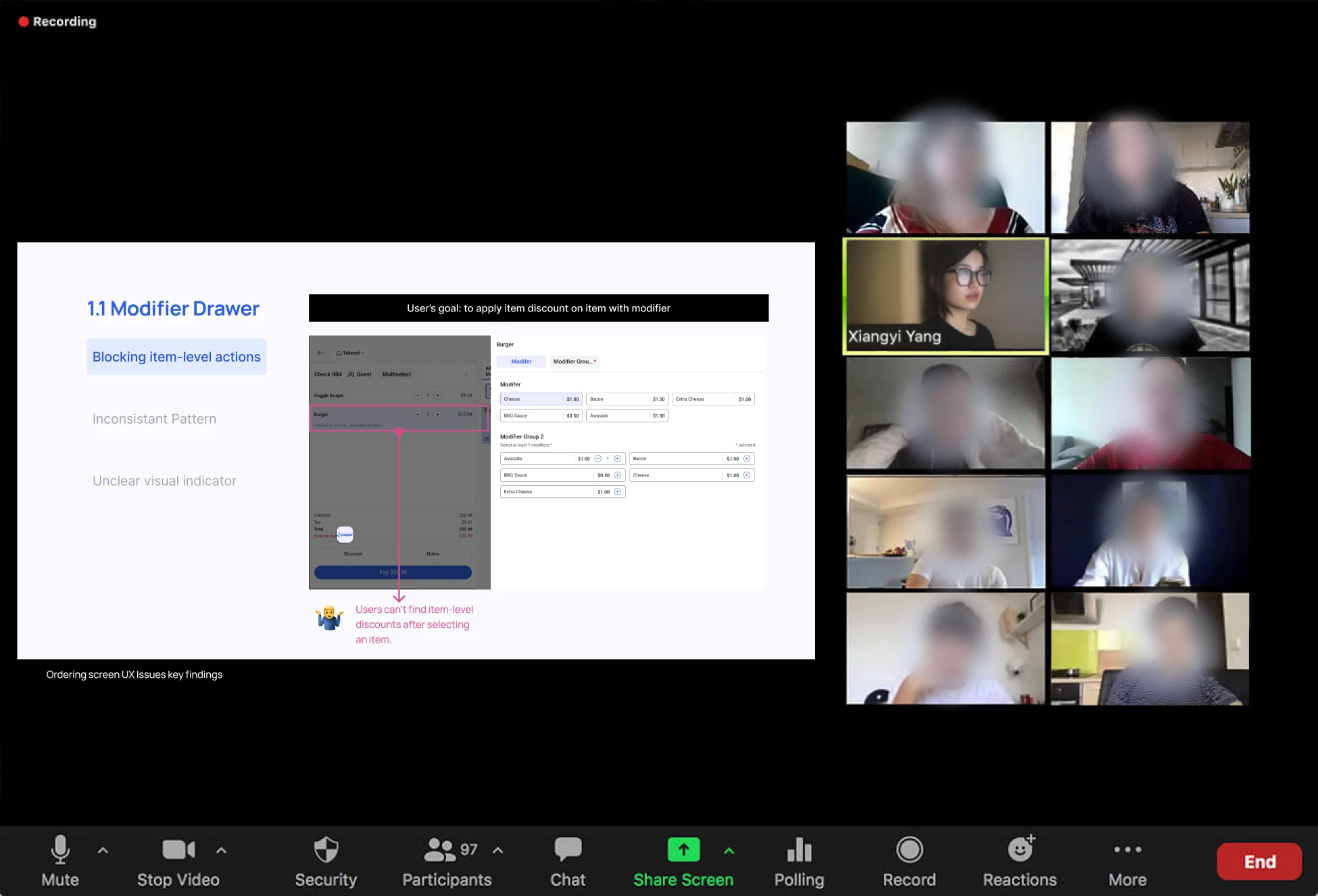
When this project started, we had to present our audit findings to the Head of Engineering and the Head of Product, and the stakes were high. A redesign this large needed real buy-in, not polite nodding. So instead of presenting what was broken from a design perspective, I structured everything around what staff were trying to do and where the system was getting in their way. That framing made the problems immediate and hard to argue with. The room understood quickly, and the conversation shifted from whether to redesign to how. I learned that insight without the right framing rarely moves anyone.
From preference to proof.
Design Direction, Lo-fi Sketch, Iterations,
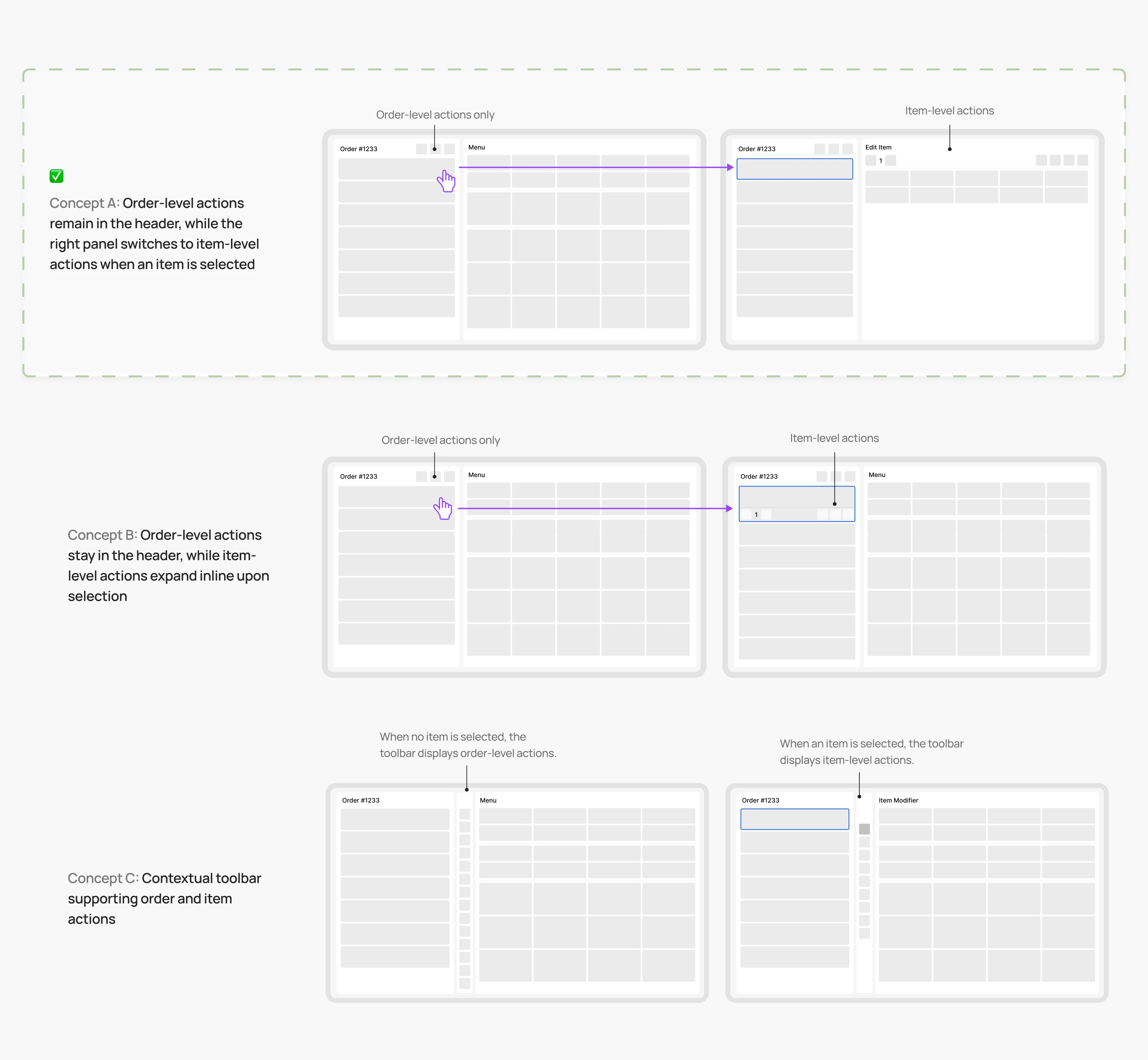
During the design phase, I hit a real decision point: different restaurants have completely different menu sizes, and what works for a small menu fails for a large one. Two layout directions both made sense on paper, and I could not pick one based on instinct alone. So I asked an engineer to pull actual menu data from our existing users. Seeing the real distribution, the average cases and the edge cases, made the decision much easier to defend. I stopped designing for a hypothetical user and started designing for the actual one. When two directions both look right, the answer is usually sitting in the data.
Ship right. Land right.
Design Handoff & Documentation, Feasibility Adjustments
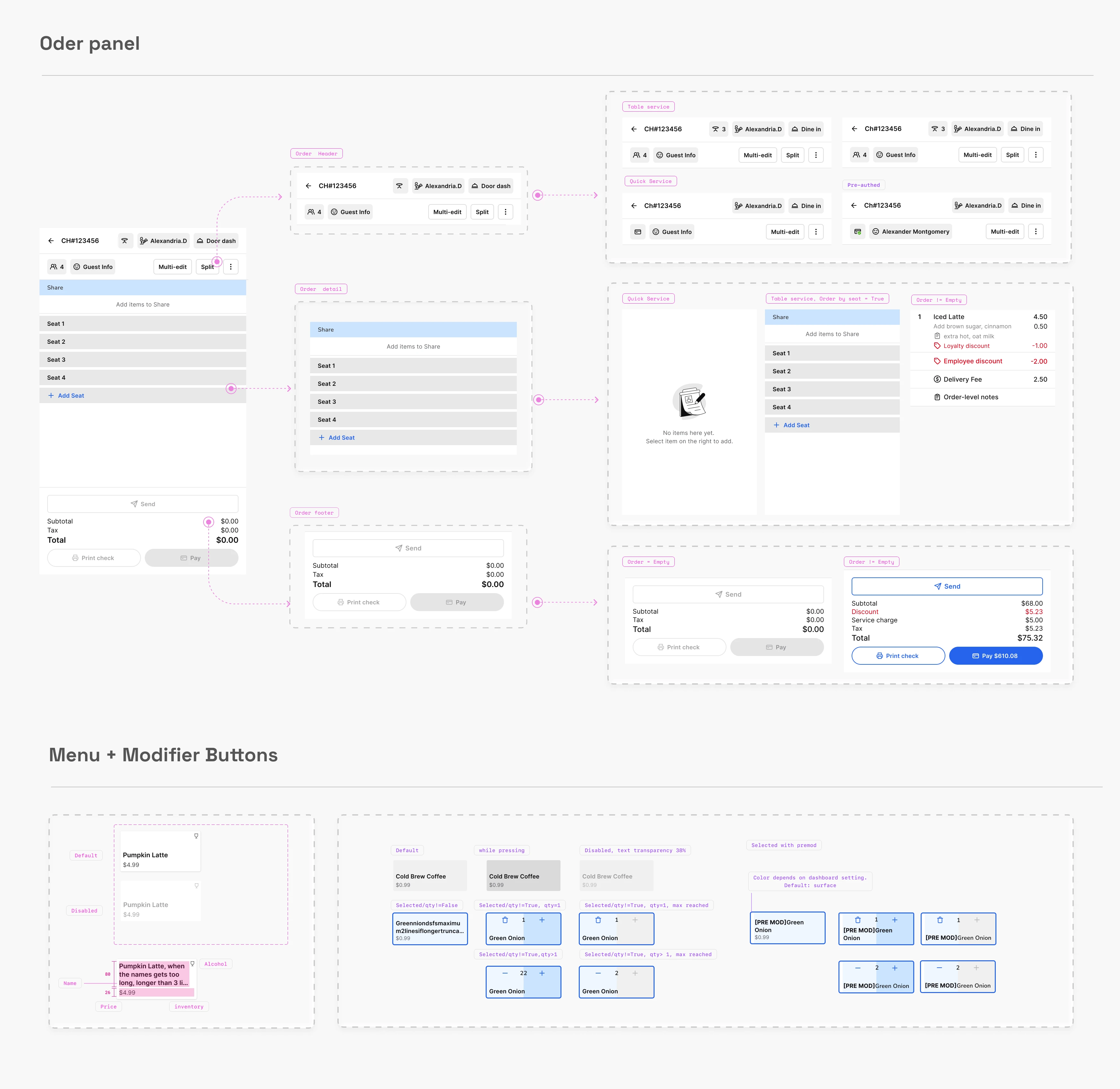
Once the handoff began, I realized the engineer, who had been present throughout the entire design process, still had significant gaps in understanding. The timeline was tight and the pressure to move fast was real. But instead of cutting corners, I went back and documented every missing state: hover, loading, empty states, and jump logic with clear flow annotations. It was not the fastest path, but it was the only one that would actually result in the design landing correctly. I learned that handoff is not the end of design. It is where design either holds or falls apart.
Lily ©2026
Made with 🖤+ 🤖+☕️
2024
B2B SaaS, POS, Tablet
POS Ordering Screen Redesign
When I joined the project, our restaurant tablet POS system had many experience issues that made the ordering flow slow and confusing.
I worked with two other designers to audit the existing product, then led usability testing in real restaurant environments to validate our direction. We focused on table service staff as our primary users and restructured the ordering flow around how they actually work. By the end of the project, I built a customized M3-based design system from scratch, giving the team a shared foundation that made future design and engineering handoffs more consistent.
Solution
[01]
Much Clearer structure
Reorganized actions into three clear levels: order-level, single-item, and bulk actions for selected Items.
Order-level actions in a reusable order panel
All order-level actions are centralized in the order panel for faster and more predictable access. Frequently used actions are surfaced directly, while less-used actions are grouped under the “More” menu based on usage patterns.
Item-level actions in a consistent panel
The previous design separated modifiers from item-level actions, making item discounts difficult to discover. The redesign introduced a consistent interaction pattern for items with and without modifiers.
Multi-edit items
Multi-edit lets users select multiple items and apply actions in bulk, such as sending items to the kitchen or applying discounts. The “Multi-edit” label was validated through usability testing.
[02]
Higher affordance for high-frequency actions
High-frequency actions were prioritized based on usage data, with consistent minimum touch targets to reduce mis-taps and support faster order taking.
[03]
Built a scalable design system
Built a M3–based design system with light and dark mode support to improve consistency and reduce design-to-development handoff time.
Most Memorable Moment
Most Memorable Moment: When design can't decide, data does.
What stayed with me wasn't the final layout. It was the moment I realized I was about to make a major design call based entirely on assumption, and I stopped myself.
We were redesigning the ordering page for a restaurant POS system, and I hit a wall. Different restaurants have wildly different menus: some have twenty items, some have two hundred. A flat layout works beautifully for the small ones. Layered filtering makes more sense for the large ones. Both were defensible. Neither felt conclusive. Instead of picking one and hoping, I asked an engineer to pull the actual menu data from our existing users. Average item counts, edge cases, the real distribution. Once I saw the numbers, the decision became obvious. I wasn't guessing anymore. I was designing for what was actually true.
That moment changed how I think about design ambiguity. When two directions both seem reasonable, it usually means I don't have enough information yet. The instinct to just pick one and move fast is real, but so is the cost of getting it wrong. My job isn't to have good taste. It's to find the most honest answer I can before I commit.
My Team & My Role
My Role
Product designer
Duration
6 weeks
Tools
Figma
Team
1 PM + 3 PD + 2 Scrum teams
We Didn't Patch the POS. We Rebuilt How It Thinks.
Less jargon. More buy-in.
Audit Existing Product, Presentation, Stakeholder Interviews
When this project started, we had to present our audit findings to the Head of Engineering and the Head of Product, and the stakes were high. A redesign this large needed real buy-in, not polite nodding. So instead of presenting what was broken from a design perspective, I structured everything around what staff were trying to do and where the system was getting in their way. That framing made the problems immediate and hard to argue with. The room understood quickly, and the conversation shifted from whether to redesign to how. I learned that insight without the right framing rarely moves anyone.
From preference to proof.
Design Direction, Lo-fi Sketch, Iterations,
During the design phase, I hit a real decision point: different restaurants have completely different menu sizes, and what works for a small menu fails for a large one. Two layout directions both made sense on paper, and I could not pick one based on instinct alone. So I asked an engineer to pull actual menu data from our existing users. Seeing the real distribution, the average cases and the edge cases, made the decision much easier to defend. I stopped designing for a hypothetical user and started designing for the actual one. When two directions both look right, the answer is usually sitting in the data.
Ship right. Land right.
Design Handoff & Documentation, Feasibility Adjustments
Once the handoff began, I realized the engineer, who had been present throughout the entire design process, still had significant gaps in understanding. The timeline was tight and the pressure to move fast was real. But instead of cutting corners, I went back and documented every missing state: hover, loading, empty states, and jump logic with clear flow annotations. It was not the fastest path, but it was the only one that would actually result in the design landing correctly. I learned that handoff is not the end of design. It is where design either holds or falls apart.
Lily ©2026
Made with 🖤+ 🤖+☕️