2025
B2B Saas, Workflow, Payments
Catering Invoice Management
When I stepped into the catering invoice project, restaurant owners were duct-taping together QuickBooks and handwritten notes just to get through a catering order, and re-entering everything into the POS by hand before every fulfillment. During this project, I ran stakeholder interviews, mapped the IA, and kept pressure-testing the design until we nailed the real problem: catering isn't one bill, it's a chain of payments across online and in-store that nobody could actually keep straight.
By the end of the project, what used to be a mess of manual workarounds became a single backend workflow with balance-based payments and automatic kitchen sync, 13% of merchants picked it up, and the feedback was consistently that it just made sense.

Solution
Invoice Creation Form
Structured invoice form based on competitor research and existing merchant workflows to align with familiar catering operations and reduce setup friction.
Scheduled Payments
Allow managers to collect deposits using either a percentage or fixed amount, and schedule when invoices are sent. The final payment is automatically calculated as the remaining balance and cannot be scheduled after the service date.
2C: Payment Email
Customers receive an email with a secure payment link to review and pay their invoice online.

Most Memorable Moment
I don't wait for clarity. I go find it.
Nobody knew where this product actually lived, back-office management system, or front-of-house POS. That one unresolved question was a crucial design problem, back then when we were just getting started.
I didn't sketch screens. I went to the PM, the ops team, and GTM team to find out how managers actually behaved. Turns out, it's almost always the manager in the back office, not the cashier at the register. That one insight gave the whole team a starting point. From there, I mapped how every part of the system connected, so no one was designing in isolation.
From that experience I realized that unclear scope is the first design problem. The most valuable thing I can do at the start of a messy project isn't open Figma. It's finding the ground so the team has something solid to stand on.
My Team & My Role
My Role
Product designer
Duration
4 weeks
Tools
Figma
Team
1 PM + 1PD + 1 Scrum team
Designing for Operational Confidence in High-Pressure Pet Care Environments
Question first. Design second.
Stakeholder Interviews, User Journey Map, Information Architecture, Success Metrics

When this project started, nobody had answered the most basic question: where does this product actually live, in the back-office management system, or at the front-of-house register? I went to the PM, the ops team, and GTM team to find out how managers actually behaved, before opening Figma. What came back was unambiguous: it's almost always the manager in the back office, not the cashier at the counter. That single answer gave the whole team a foundation to build on. I've learned that the most expensive design mistake isn't a bad screen. It's starting in the wrong place.
Think deeply. Decide clearly.
Design Direction, Lo-fi Sketch, Design Critiques
As discovery progressed, I faced a real design decision with no time to test: should invoice creation and preview live on the same screen, or across two separate steps? Both directions existed in the market. But I knew our users, restaurant operators who aren't particularly tech-savvy, and putting editing and preview on one screen would overwhelm them. I chose the two-step flow. No usability study, just a judgment call grounded in what I understood about how these users think. After launch, frontline feedback confirmed it: the flow was easy to pick up. Intuition isn't guessing. It's what deep user understanding looks like under pressure.
From pushback to breakthrough.
Pushback, Cross-functional Collaboration, Iterations
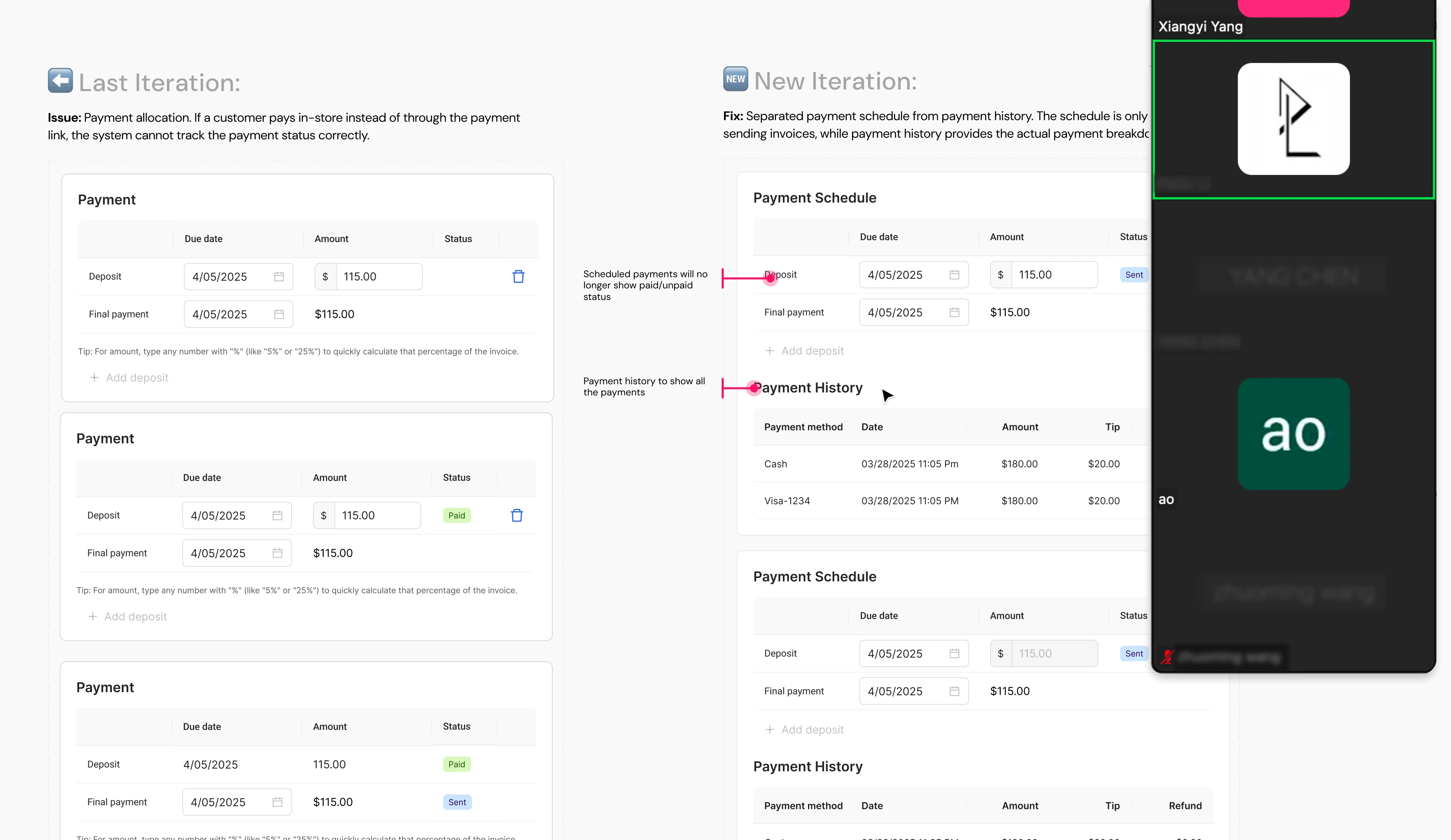
Once the direction became clear on invoice structure, I hit a wall: engineering challenged my payment design, and I didn't have a good answer in the room. My first instinct was defensiveness, but I chose to listen instead, to understand exactly what they were seeing that I had missed. What I heard reshaped everything. I'd been designing around how many invoices to create, when the real question was simpler: how much does the user still owe? I came back with a balance-based model that the whole team could get behind. Being challenged isn't failure. It's often the fastest way to find the right answer.
Lily ©2026
Made with 🖤+ 🤖+☕️
2025
B2B Saas, Workflow, Payments
Catering Invoice Management
When I stepped into the catering invoice project, restaurant owners were duct-taping together QuickBooks and handwritten notes just to get through a catering order, and re-entering everything into the POS by hand before every fulfillment. During this project, I ran stakeholder interviews, mapped the IA, and kept pressure-testing the design until we nailed the real problem: catering isn't one bill, it's a chain of payments across online and in-store that nobody could actually keep straight.
By the end of the project, what used to be a mess of manual workarounds became a single backend workflow with balance-based payments and automatic kitchen sync, 13% of merchants picked it up, and the feedback was consistently that it just made sense.
Solution
Invoice Creation Form
Structured invoice form based on competitor research and existing merchant workflows to align with familiar catering operations and reduce setup friction.
Scheduled Payments
Allow managers to collect deposits using either a percentage or fixed amount, and schedule when invoices are sent. The final payment is automatically calculated as the remaining balance and cannot be scheduled after the service date.
2C: Payment Email
Customers receive an email with a secure payment link to review and pay their invoice online.
Most Memorable Moment
I don't wait for clarity. I go find it.
Nobody knew where this product actually lived, back-office management system, or front-of-house POS. That one unresolved question was a crucial design problem, back then when we were just getting started.
I didn't sketch screens. I went to the PM, the ops team, and GTM team to find out how managers actually behaved. Turns out, it's almost always the manager in the back office, not the cashier at the register. That one insight gave the whole team a starting point. From there, I mapped how every part of the system connected, so no one was designing in isolation.
From that experience I realized that unclear scope is the first design problem. The most valuable thing I can do at the start of a messy project isn't open Figma. It's finding the ground so the team has something solid to stand on.
My Team & My Role
My Role
Product designer
Duration
4 weeks
Tools
Figma
Team
1 PM + 1PD + 1 Scrum team
Designing for Operational Confidence in High-Pressure Pet Care Environments
Question first. Design second.
Stakeholder Interviews, User Journey Map, Information Architecture, Success Metrics
When this project started, nobody had answered the most basic question: where does this product actually live, in the back-office management system, or at the front-of-house register? I went to the PM, the ops team, and GTM team to find out how managers actually behaved, before opening Figma. What came back was unambiguous: it's almost always the manager in the back office, not the cashier at the counter. That single answer gave the whole team a foundation to build on. I've learned that the most expensive design mistake isn't a bad screen. It's starting in the wrong place.
Think deeply. Decide clearly.
Design Direction, Lo-fi Sketch, Design Critiques
As discovery progressed, I faced a real design decision with no time to test: should invoice creation and preview live on the same screen, or across two separate steps? Both directions existed in the market. But I knew our users, restaurant operators who aren't particularly tech-savvy, and putting editing and preview on one screen would overwhelm them. I chose the two-step flow. No usability study, just a judgment call grounded in what I understood about how these users think. After launch, frontline feedback confirmed it: the flow was easy to pick up. Intuition isn't guessing. It's what deep user understanding looks like under pressure.
From pushback to breakthrough.
Pushback, Cross-functional Collaboration, Iterations
Once the direction became clear on invoice structure, I hit a wall: engineering challenged my payment design, and I didn't have a good answer in the room. My first instinct was defensiveness, but I chose to listen instead, to understand exactly what they were seeing that I had missed. What I heard reshaped everything. I'd been designing around how many invoices to create, when the real question was simpler: how much does the user still owe? I came back with a balance-based model that the whole team could get behind. Being challenged isn't failure. It's often the fastest way to find the right answer.
Lily ©2026
Made with 🖤+ 🤖+☕️